
Page speed & Core Web Vitals
Paste a URL and Leadee runs a Lighthouse lab report on mobile and desktop, scoring Core Web Vitals (LCP, CLS, TBT) and flagging the slowest elements with a concrete fix — slow, unstable pages lose both human visitors and the AI crawlers that time out before indexing them.
Updated
- No email needed
- Free, no sign-up
Example result
Run it now
At a glance
- 3 items
- What it checks
- 4
- Questions answered
- No email needed
- To get a result
- Is my site healthy?
- Answers
What does it check?
Lighthouse lab scores on mobile and
Lighthouse lab scores on mobile and desktop
Core Web Vitals
Core Web Vitals: Largest Contentful Paint, Cumulative Layout Shift, and Total Blocking Time (INP once field data exists)
Real-world PSI field data, when enough
Real-world PSI field data, when enough Chrome traffic exists for that URL
What does a result look like?
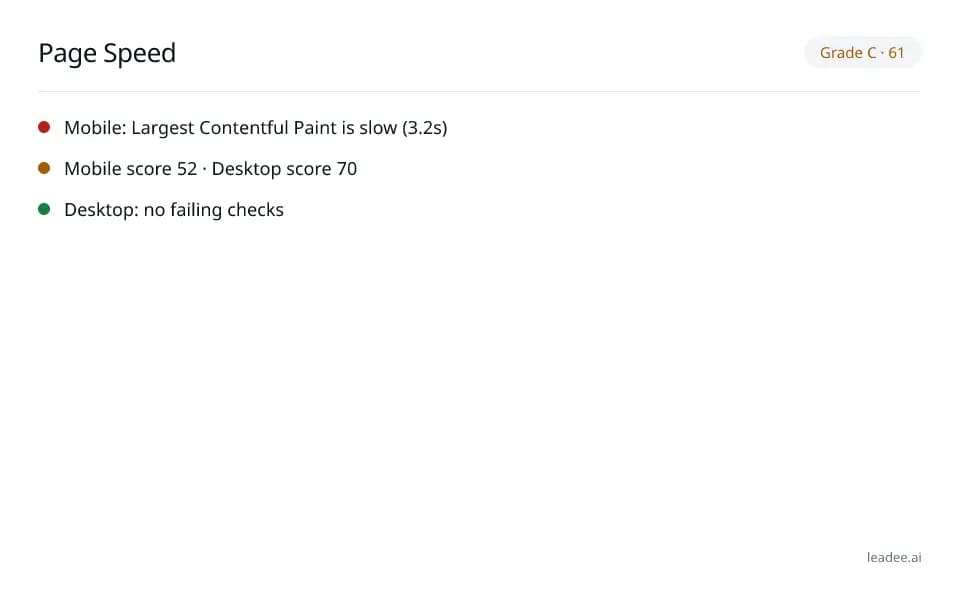
Grade C · 61
- Mobile: Largest Contentful Paint is slow (3.2s)
- Mobile score 52 · Desktop score 70
- Desktop: no failing checks
Sample from a real run, 14 Nov 2026.
How do I read and fix the result?
Mobile and desktop get separate scores because they usually differ — fix the slowest-flagged element first (often the Largest Contentful Paint image or a render-blocking script), since one fix often improves several metrics at once.
Paste the URL you want to check.
Read the mobile and desktop scores and the Core Web Vitals they are built from.
Open the slowest-flagged element and apply its fix (often an image, a font or a render-blocking script).
Re-run the check after you publish a fix to confirm the score moved.
Check back after real traffic builds up to see the field data once it appears.
Who is it for?

Engineering and field-service teams
Sites that must stay fast, secure and crawlable.

Local and regional printers
Small-business sites that can't afford downtime or a breach.

Distribution and logistics
Order and tracking pages that must never time out.
What are the limits?
What are the limits?
Lab data is a single simulated run, not what your real visitors experienced; field data only appears once a site has enough Chrome traffic, so it can come back empty for low-traffic pages. Each report is cached for 24 hours per URL.
Questions
What are Core Web Vitals?
Google's three user-experience metrics, defined at https://web.dev/articles/vitals: Largest Contentful Paint (LCP, how long the biggest visible element takes to render), Cumulative Layout Shift (CLS, how much the page jumps around while loading) and the newer Interaction to Next Paint (INP, replacing Total Blocking Time for real-user responsiveness). This tool reports lab TBT as the Lighthouse proxy for responsiveness, and INP once field data is available.
What is the difference between lab data and field data?
Lab data comes from a single simulated Lighthouse run against your URL right now — reproducible, but not what a real visitor on a real network experienced. Field data (from the Chrome User Experience Report / PSI) is the aggregate of real Chrome users who actually visited that page over the last 28 days; it only exists once a site has enough Chrome traffic, which is why the field box can come back empty for low-traffic pages. Google's own TTFB guidance (https://web.dev/articles/ttfb) uses the same lab-vs-field distinction for a related metric.
Why does page speed matter for AI visibility, not just human visitors?
AI crawlers and answer engines fetch pages on a budget: a page that times out or takes seconds to render its content can get skipped or only partially read before the crawler moves on, the same way a slow page loses impatient human visitors. A fast, stable page is more likely to be fully read and correctly cited.
How often can I run this, and is the result cached?
Each report is cached for 24 hours per URL, and this tool is rate-limited to 2 runs per hour per visitor — the same limits as Leadee's other free tools, to keep the shared Lighthouse budget available for everyone.
Can GEO guarantee results?
No. AI answer engines change their output frequently, and no vendor — including Leadee — can guarantee a ranking or a mention. Leadee publishes confidence intervals on every metric so you can see how much a result can vary run to run.
How does Leadee measure AI visibility?
Leadee runs your prompt set against each AI engine on a weekly to daily schedule, depending on plan, through official vendor APIs (OpenAI, Gemini, Perplexity, Anthropic, DataForSEO) — never by scraping consumer chat interfaces — and reports mention rate, citation rate, average position, share of voice and sentiment with a 95% confidence interval.
Who do I talk to?
Email support@leadee.ai or use Talk to an expert at https://leadee.ai/contact-sales — the Netbase JSC team behind Leadee replies by email or WhatsApp — or WhatsApp the CEO directly at https://wa.me/84937869689.
Related
 Free tool
s
 Free tool
Site Speed for AI Crawlers
 Free tool
Technical SEO audit
Keep page speed fast as your site changes.
Leadee tracks Core Web Vitals alongside the rest of your AI visibility and flags it when a page slows down.