
Website security check
Enter a domain and Leadee passively checks what a normal browser already sees — HTTPS redirect, TLS certificate and protocol, HSTS and security headers, homepage cookie flags, mixed content, and a fixed list of commonly-exposed paths like .git/HEAD and .env — never an active scan, never a guessed path, never a login attempt.
Updated
- No email needed
- Free, no sign-up
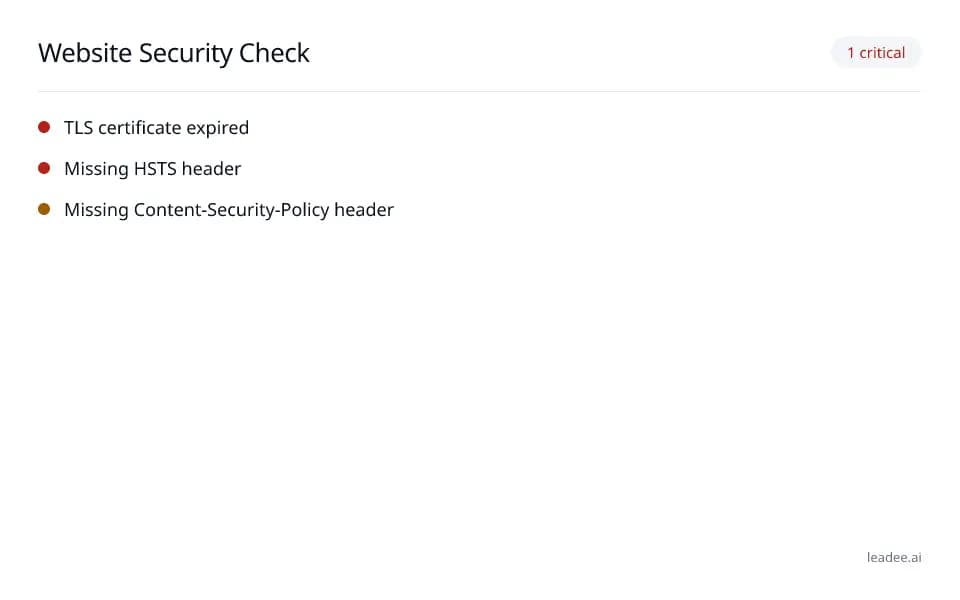
Example result
Run it now
At a glance
- 4 items
- What it checks
- 3
- Questions answered
- No email needed
- To get a result
- Is my site healthy?
- Answers
What does it check?
HTTPS redirect, TLS certificate and
HTTPS redirect, TLS certificate and protocol (TLS is the encryption that puts the padlock in a browser address bar)
HSTS (a header that forces browsers to
HSTS (a header that forces browsers to only ever load your site over HTTPS, never plain HTTP) and other security headers: CSP (Content-Security-Policy, which blocks unexpected scripts from running), X-Content-Type-Options, X-Frame-Options, Referrer-Policy, Permissions-Policy
Homepage cookie flags and mixed content (a
Homepage cookie flags and mixed content (a secure HTTPS page that still loads an insecure HTTP file, which browsers flag as a warning)
A fixed list of commonly-exposed paths
A fixed list of commonly-exposed paths like .git/HEAD, .env and backup.zip
What does a result look like?
1 critical
- TLS certificate expired
- Missing HSTS header
- Missing Content-Security-Policy header
Sample from a real run, 14 Nov 2026.
How do I read and fix the result?
An expired or soon-to-expire TLS certificate and a missing HSTS header are the highest-impact findings — fix those first; the remaining headers and cookie flags narrow what an attacker can do if something else ever goes wrong.
Enter the domain you want to check.
Read the findings, starting with the TLS certificate and HSTS header.
Renew an expired certificate and add the missing headers at your server or CDN.
Verify domain ownership (DNS TXT or on-domain email) to see the detail behind any exposed-file finding.
Re-run the check after you deploy the fix.
Who is it for?

Engineering and field-service teams
Sites that must stay fast, secure and crawlable.

Local and regional printers
Small-business sites that can't afford downtime or a breach.

Distribution and logistics
Order and tracking pages that must never time out.
What are the limits?
What are the limits?
This is a passive check only — one request each for a fixed, published list of paths, never an active scan, never a guessed path, never a login attempt; an exposed-file finding's detail is only shown once you verify you own the domain.
Questions
Does this tool actively probe for vulnerabilities?
No — it is passive only: it reads what a normal browser receives (headers, TLS handshake, HTTPS redirect, homepage cookies) plus one request each for a fixed, published list of commonly-exposed paths. It never fuzzes, never guesses paths outside that list, and never attempts a login.
Why does an exposed-file finding just say "verify that you own this domain"?
Findings like an exposed .git/HEAD or a version number in a response header could help an attacker, so Leadee only shows the affected URL and signature to a signed-in user who has verified domain ownership (DNS TXT or on-domain email) — a visitor or an unverified member sees only that the finding exists, never the detail.
How many requests does a scan make?
Never more than 25 requests to the target domain — one domain per run, no crawling beyond the homepage, matching the fixed check list this tool publishes rather than an open-ended scan.
Can GEO guarantee results?
No. AI answer engines change their output frequently, and no vendor — including Leadee — can guarantee a ranking or a mention. Leadee publishes confidence intervals on every metric so you can see how much a result can vary run to run.
How does Leadee measure AI visibility?
Leadee runs your prompt set against each AI engine on a weekly to daily schedule, depending on plan, through official vendor APIs (OpenAI, Gemini, Perplexity, Anthropic, DataForSEO) — never by scraping consumer chat interfaces — and reports mention rate, citation rate, average position, share of voice and sentiment with a 95% confidence interval.
Who do I talk to?
Email support@leadee.ai or use Talk to an expert at https://leadee.ai/contact-sales — the Netbase JSC team behind Leadee replies by email or WhatsApp — or WhatsApp the CEO directly at https://wa.me/84937869689.
Related
 Free tool
s
 Free tool
Technical SEO audit
 Free tool
Email security check
- Free tool
AI Crawlers and Robots.txt
 Service
Pricing
 Proof & trust
Methodology
Keep your security headers right as your site changes.
Leadee tracks these headers alongside the rest of your AI visibility and flags it when one goes missing.