
Plan topic clusters and internal links in Leadee
Leadee groups your pages into topic clusters from the searches that already reach them, then plans the internal links each cluster needs: hub to spoke, spoke to hub, and spoke to spoke. It takes 4 steps and about 20 minutes to read the plan and send it to your site team. For NetbaseJSC, Leadee built 166 clusters and planned 430 internal links on 20 Nov 2026.
By the Leadee team at Netbase JSC · Updated
Before you start
- You need
- A Leadee project with Google Search Console (and ideally Bing) connected; a site scan
- Time
- About 20 minutes to review; your site team applies the links
- Applies to
- Every Leadee plan; any CMS
- Tested
- Clusters of 20 Nov 2026 on netbasejsc.com, search data 11 Jul – 22 Nov 2026
Why clusters and internal links matter for AI search
AI assistants and search engines judge a site by how well it covers a topic, not by one page. A cluster is a hub page plus the pages that answer the related questions, linked to each other. Good internal links tell crawlers which page is the main answer and help them reach every page in the group.
Step 1: Open Clusters & keywords › Cluster map
The Table tab lists every cluster with its pages, priority, the share of pages that pass Leadee's content standard (% pass), the pages with no link in from the rest of the cluster, and the gate status.
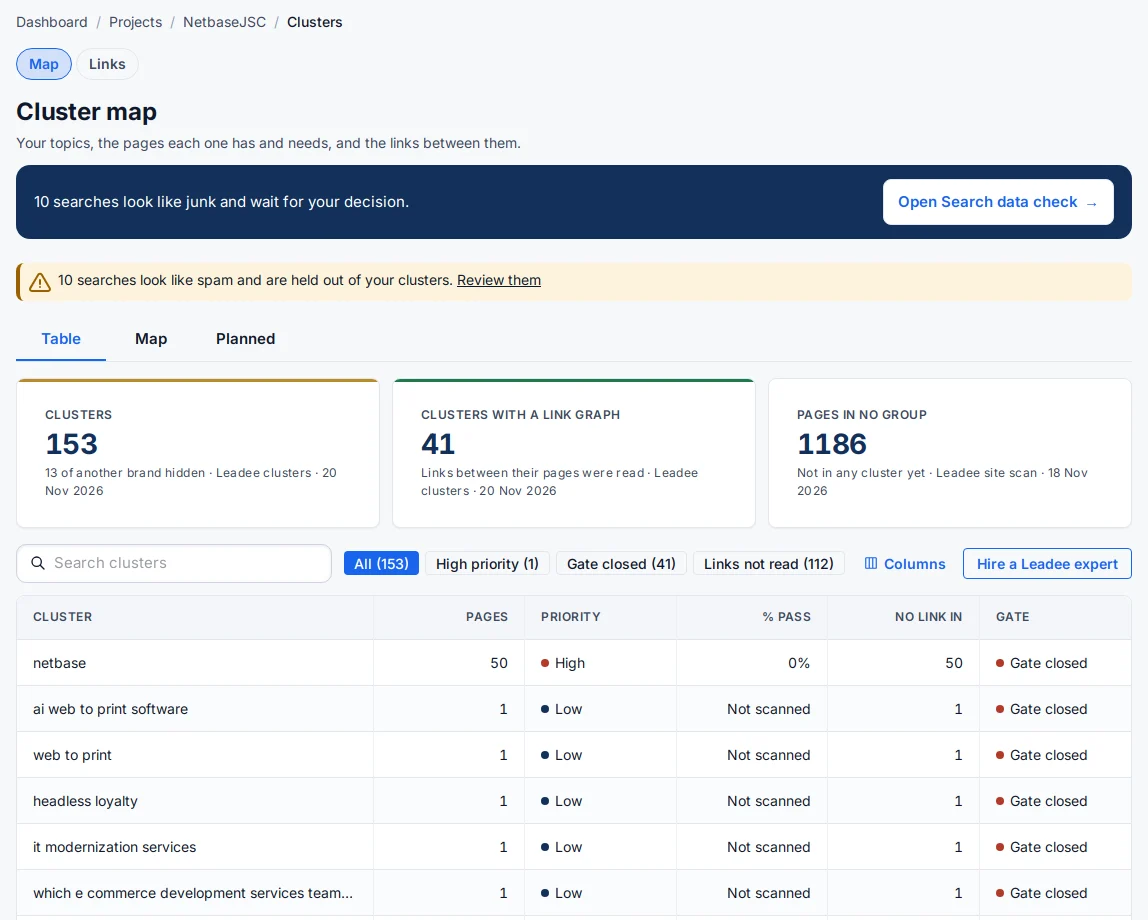
For NetbaseJSC: 153 clusters shown (13 more belong to another Netbase brand and are hidden), 41 clusters with a link graph, and 1,186 pages in no group yet from the site scan of 18 Nov 2026.
Expected result: you see your clusters and which ones need work.
Step 2: Pick the clusters to work first
Use the filters: High priority, Gate closed and Links not read. Start with high-priority clusters that have many pages and many pages with no link in.
On NetbaseJSC the one high-priority cluster was the brand cluster "netbase": 50 pages, 0% passing the standard yet, and 50 pages with no link in from the cluster. That is a clear first job: link the brand pages to each other and to the hub.
Expected result: two or three clusters to fix this week.
Step 3: Read the link plan on the Links tab
Switch to Links. The cards show how many planned links are live. The tiles below count Articles, With suggestions, Links planned, Links live and Links missing.
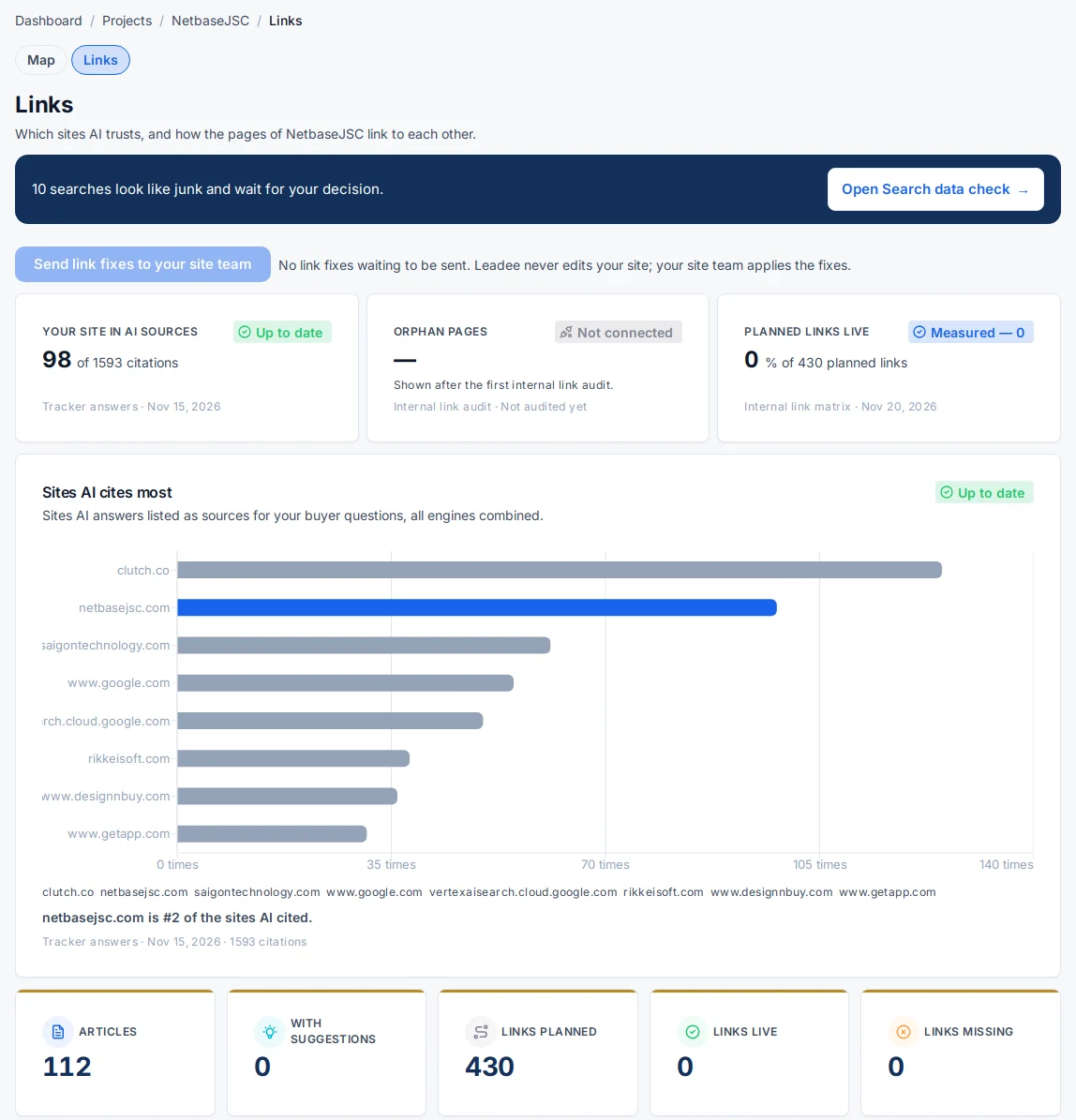
For NetbaseJSC on 20 Nov 2026: 112 articles and 430 planned links: 112 hub to spoke, 112 spoke to hub and 206 spoke to spoke. None were live yet. The same screen shows why this matters for AI: netbasejsc.com was already the second most cited site in AI answers for its buyer questions.
Expected result: you know how many links your site team needs to add.
Step 4: Send the link fixes to your site team
Select the articles in Suggestions by article and click Send selected to your site team, or use Send link fixes to your site team at the top. Each suggestion gives the source page, target page and anchor text.
Leadee never edits your site. Your team, or your own AI agent through the Leadee API and MCP server, applies the links. After the next site scan, Leadee reads the pages again and moves each planned link to Live or Missing.
Expected result: a batch of link fixes is with your site team.
How to check it worked
- Links live goes up after the next scan, and Planned links live shows a percentage above 0.
- In the cluster table, No link in goes down for the clusters you worked.
- The Map tab shows the hub connected to every spoke.
Common problems and how to fix them
Many pages are "in no group"
- Sign:
- a large "Pages in no group" number; 1,186 for NetbaseJSC.
- Cause:
- those pages have no search data yet, or they are translations and archive pages with few impressions.
- Fix:
- do not force them into clusters. Work the clusters that have search demand first; new pages join a cluster once searches reach them.
- Prevent:
- plan new pages inside an existing cluster before you write them.
Clusters show "Links not read"
- Sign:
- a cluster's gate says Links not read, with a dash under No link in.
- Cause:
- the internal link audit has not read those pages yet; on NetbaseJSC this was mostly Korean and Japanese pages.
- Fix:
- let the weekly link audit run, or start a site scan, then check again.
- Prevent:
- keep your sitemap listing every live language version.
A cluster mixes two brands or topics
- Sign:
- pages from another site or an unrelated topic in a cluster.
- Cause:
- shared queries, or a brand that covers several sites.
- Fix:
- Leadee hides clusters that belong to another brand of the same company, as it did for 13 NetbaseJSC clusters. For an unrelated topic, exclude the searches in Search data check.
- Prevent:
- keep one project per website.
FAQ
How does Leadee build clusters?
From your own search data: the queries from Google Search Console and Bing and the pages they reach. Pages that answer the same group of searches land in one cluster, built around a hub page. The footer of the Cluster map shows the data period used; for NetbaseJSC, 11 Jul to 22 Nov 2026.
What is the difference between hub, spoke and spoke-to-spoke links?
Hub to spoke: the main page links down to each detail page. Spoke to hub: each detail page links back to the main page. Spoke to spoke: related detail pages link to each other where it helps the reader. All three together make the cluster easy to crawl and easy to understand.
Does Leadee add the links to my site?
No. Leadee plans, sends and then verifies. Your site team or your own agent applies the change, so nothing on your site changes without your approval.
How many links should we add at once?
Work in batches you can measure, for example one or two clusters a week, so you can see which change moved impressions and AI citations.
Can GEO guarantee results?
No. AI answer engines change their output frequently, and no vendor — including Leadee — can guarantee a ranking or a mention. Leadee publishes confidence intervals on every metric so you can see how much a result can vary run to run.
How does Leadee measure AI visibility?
Leadee runs your prompt set against each AI engine on a weekly to daily schedule, depending on plan, through official vendor APIs (OpenAI, Gemini, Perplexity, Anthropic, DataForSEO) — never by scraping consumer chat interfaces — and reports mention rate, citation rate, average position, share of voice and sentiment with a 95% confidence interval.
Who do I talk to?
Email support@leadee.ai or use Talk to an expert at https://leadee.ai/contact-sales — the Netbase JSC team behind Leadee replies by email or WhatsApp — or WhatsApp the CEO directly at https://wa.me/84937869689.
What to do next
Previous: Find citation gaps. Back to all Leadee guides. See how this fits together in the NetbaseJSC case study.