
Robots.txt tester
Paste a robots.txt file or enter a URL and Leadee shows an allow/block matrix for every major AI bot (training crawlers like GPTBot and CCBot, and search/answer bots like OAI-SearchBot and PerplexityBot) at any path you choose, flags syntax errors, an oversized file (over the 500 KiB RFC 9309 limit) and a missing or relative Sitemap: line.
Updated
- No email needed
- Free, no sign-up
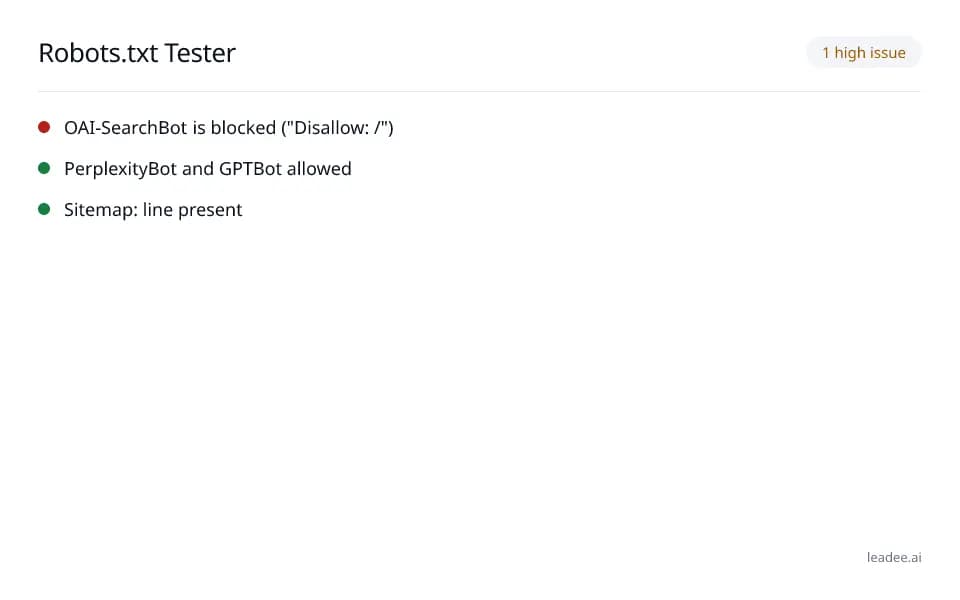
Example result
Run it now
At a glance
- 4 items
- What it checks
- 6
- Questions answered
- No email needed
- To get a result
- Can AI read my site?
- Answers
What does a result look like?
1 high issue
- OAI-SearchBot is blocked ("Disallow: /")
- PerplexityBot and GPTBot allowed
- Sitemap: line present
Sample from a real run, 15 Nov 2026.
What does it check?
See the full methodology at /methodology for how every Leadee check is scored and weighted.
AI search/answer bots allowed
Search and answer crawlers such as OAI-SearchBot, PerplexityBot and Claude-SearchBot can fetch your pages. Checked 15 November 2026.
AI training bots — reported, not penalized
Whether training crawlers such as GPTBot and CCBot are blocked is listed, but never lowers your score. Checked 15 November 2026.
File under 500 KiB, valid syntax, reachable
The file answers, parses cleanly and stays within the size crawlers read (RFC 9309 §2.5). Checked 15 November 2026.
Sitemap: line present and an absolute URL
At least one Sitemap: line gives a full URL, not a relative path (RFC 9309 §2.3). Checked 15 November 2026.
How do I read and fix the result?
A search/answer bot (OAI-SearchBot, PerplexityBot, Claude-SearchBot) blocked at a path you want indexed is the highest-impact finding — it removes you from that answer immediately; a blocked training bot (GPTBot, CCBot) is a legitimate policy choice, not necessarily something to fix.
Enter your site's URL, or paste your robots.txt file text directly.
Pick the path you want to test (defaults to the homepage, "/").
Review the bot matrix: which AI bots are allowed or blocked at that path, and why.
Fix any syntax, size or Sitemap: issues the checker flags, then re-test.
Who is it for?

Manufacturers
Product and spec pages AI engines need to parse correctly.

Professional services firms
Service pages that need clear Organization and entity markup.

B2B suppliers
Catalogue and partner pages AI crawlers must be able to read.
What are the limits?
What are the limits?
This evaluates your robots.txt file per RFC 9309, the same rules a real crawler follows — it does not simulate a live fetch against your server with each bot's real user agent (see the AI crawlability check for that).
Questions
Why does robots.txt matter for AI search visibility?
Many sites accidentally block AI bots with a blanket "Disallow: /" rule meant for something else, or a security plugin that blocks "unknown" user agents by default. A single misplaced rule can remove a site from ChatGPT, Perplexity or Google AI Mode answers entirely, with no warning.
What is the difference between an AI "training" bot and a "search" bot?
Training bots (GPTBot, CCBot, Google-Extended, Applebot-Extended) crawl content to train future AI models — blocking them is a legitimate policy choice with no immediate visibility impact. Search/answer bots (OAI-SearchBot, PerplexityBot, Claude-SearchBot) fetch pages in real time to answer a specific user question — blocking them removes you from that answer right away. OpenAI documents its own three crawlers and their separate purposes at https://developers.openai.com/api/docs/bots.
Does this tool check my actual server, or just the robots.txt text?
It reads your robots.txt file (fetched live or pasted) and computes what every bot is allowed to do per RFC 9309 (https://www.rfc-editor.org/rfc/rfc9309), the IETF standard a real crawler follows. It does not probe your server live with each bot's real user agent; for that, see the free AI crawlability check.
What counts as a robots.txt syntax error?
A line that has no ":" at all (not a valid directive) is flagged as a syntax error. A directive name this tool does not recognize is flagged separately as informational, since crawlers simply ignore directives they don't understand rather than treating them as errors.
Why does the tool flag my Sitemap: line?
A Sitemap: line must be an absolute URL (starting with http:// or https://) — a relative path like "/sitemap.xml" is invalid there and most crawlers will not resolve it. The tool also flags when no Sitemap: line exists at all, since it is the first place most crawlers look.
Can I test a path other than my homepage?
Yes — enter any path (for example "/products/" or "/blog/some-post") and the bot matrix re-evaluates every bot against that specific path, since a Disallow rule for one section of a site often does not apply to others.
Can GEO guarantee results?
No. AI answer engines change their output frequently, and no vendor — including Leadee — can guarantee a ranking or a mention. Leadee publishes confidence intervals on every metric so you can see how much a result can vary run to run.
How does Leadee measure AI visibility?
Leadee runs your prompt set against each AI engine on a weekly to daily schedule, depending on plan, through official vendor APIs (OpenAI, Gemini, Perplexity, Anthropic, DataForSEO) — never by scraping consumer chat interfaces — and reports mention rate, citation rate, average position, share of voice and sentiment with a 95% confidence interval.
Who do I talk to?
Email support@leadee.ai or use Talk to an expert at https://leadee.ai/contact-sales — the Netbase JSC team behind Leadee replies by email or WhatsApp — or WhatsApp the CEO directly at https://wa.me/84937869689.
Which tools go with this one?
- Free tool
Robots.txt Generator
Generate a robots.txt file with one click using an AI-bot preset — allow AI search, block AI training, or block all AI — with a diff before you publish.
Learn more - Free tool
AI Bot Log Analyzer
Drop an Apache, nginx or Cloudflare log. See which AI bots visited, which pages they read, their status codes and whether each IP is in the published range.
Learn more - Free tool
Sitemap Validator
Check an XML sitemap or sitemap index against sitemaps.org: namespace, 50,000 URL and 50 MB limits, lastmod, child sitemaps, robots.txt and 20 sampled URLs.
Learn more - Leadee product
AI Visibility Audit
Score how easily ChatGPT, Gemini and other AI engines can read, cite and trust your site — crawler access, schema, llms.txt and more.
Learn more
Related
 Free tool
s
 Free tool
Robots.txt generator
 Free tool
Index checker
 Free tool
AI Crawlers and Robots.txt
 Service
Pricing
 Proof & trust
Methodology
Monitor your robots.txt and AI bot access, not just once.
Leadee tracks AI crawler access alongside the rest of your AI visibility — not a one-off check.