
Connect Google Search Console and Bing Webmaster Tools to Leadee
You connect search data to Leadee in 4 steps and about 10 minutes. Copy the Leadee bot address, give it read access in Google Search Console, add Bing Webmaster Tools, then press Verify. Leadee only reads the data and syncs it every day. On 25 Nov 2026 the NetbaseJSC project held 43,198 Search Console rows, with a sync logged every night.
By the Leadee team at Netbase JSC · Updated
Before you start
- You need
- Owner or full access to the site in Google Search Console and in Bing Webmaster Tools; a Leadee project for the site
- Time
- About 10 minutes, plus up to one day for the first full sync
- Applies to
- Every Leadee plan, any website
- Tested
- 25 Nov 2026 on netbasejsc.com
Why connect search data first
Every other Leadee screen gets better with real search data. Clusters group your pages by the searches that already reach them. Opportunities find queries where you sit on page 2. The monthly report compares clicks and impressions with the month before. Without a connection those screens can only guess.
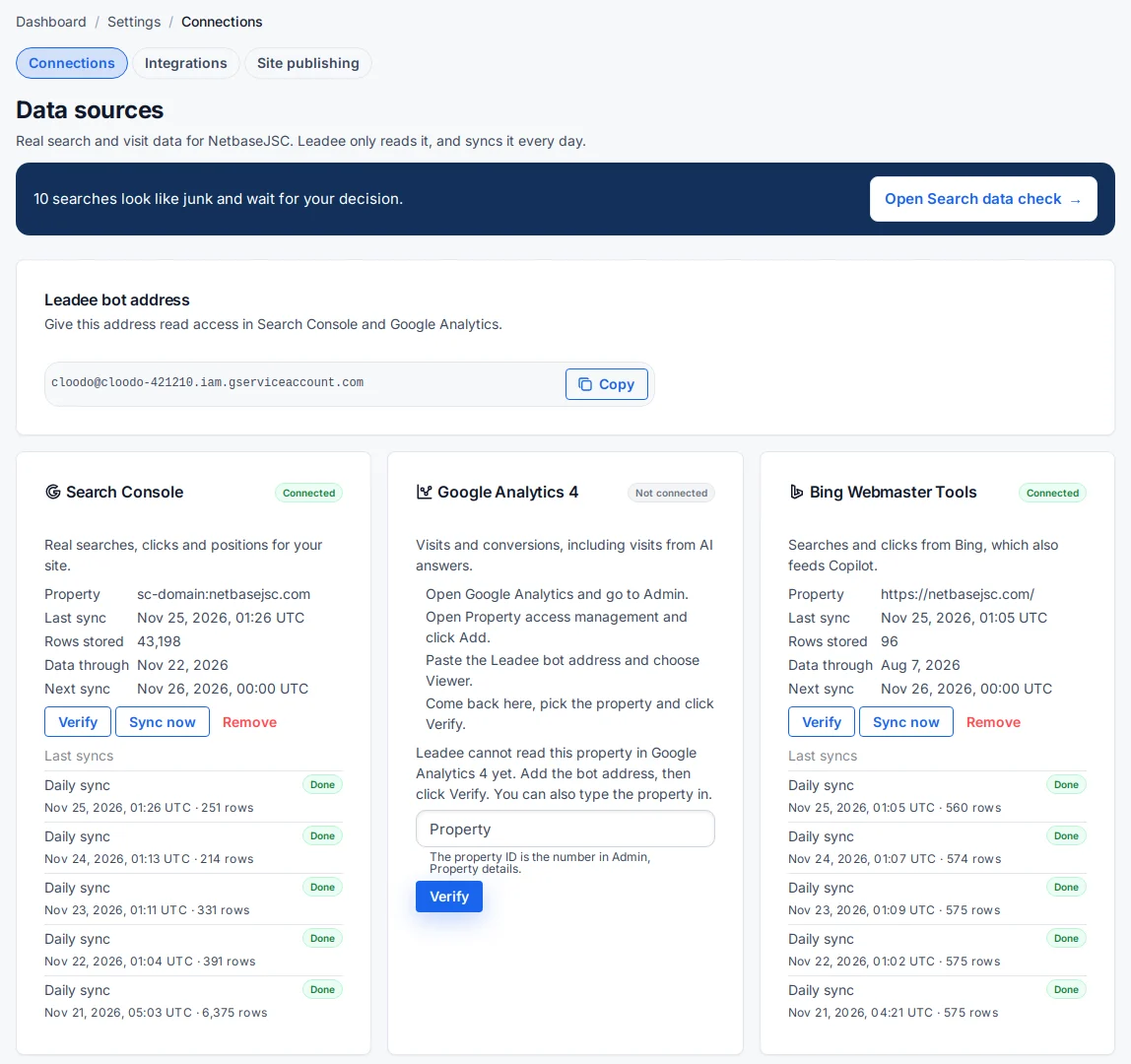
Step 1: Open Settings › Connections and copy the Leadee bot address
Open your project, then Settings › Connections. The top card is the Leadee bot address. Click Copy.
The bot address is a Google service account. It is the same address for every Leadee user, so it is safe to paste into your Google accounts. It can only read what you share with it.
Expected result: the bot address is on your clipboard.
Step 2: Add the bot address as a user in Google Search Console
In Google Search Console, pick your property, open Settings › Users and permissions, and click Add user. Paste the bot address and choose Restricted permission. A domain property (for example sc-domain:netbasejsc.com) gives Leadee every subdomain and language folder at once, so pick it when you have one.
Back in Leadee, choose the property in the Search Console card and click Verify.
Expected result: the card shows Connected, the property name, and a first entry under Last syncs.
Step 3: Connect Bing Webmaster Tools
Bing data also feeds Microsoft Copilot, so it matters for AI search. In Bing Webmaster Tools, open Settings › API access and create an API key. In Leadee, enter your site URL and the key in the Bing Webmaster Tools card, then click Verify.
Expected result: the Bing card shows Connected, the property (for NetbaseJSC: https://netbasejsc.com/) and a next sync time.
Step 4: Run the first sync and read the sync history
Click Sync now on each card. The first sync loads past data, so it can take a few minutes. After that Leadee syncs at 00:00 UTC every day.
Each card lists Rows stored, Data through and the last five syncs with their row counts. On 25 Nov 2026 the NetbaseJSC Search Console card showed 43,198 rows stored and data through 22 Nov 2026. Google holds back the last two to three days, so "data through" is always a little behind today.
Expected result: every sync line shows Done and a row count.
How to check it worked
- The Data sources page shows Connected on both cards and a Done line for today's sync.
- Results › Report shows clicks and impressions with "Source: Google Search Console" under each number.
- Clusters & keywords fills with the searches that reach your pages.
Common problems and how to fix them
"Data through" stays weeks behind
- Sign:
- the sync says Done, but Data through does not move. On NetbaseJSC the Bing card synced every night but its data stopped at 7 Aug 2026.
- Cause:
- the source itself has no newer rows for that property, often because the site was moved or re-verified under another property.
- Fix:
- open the property in Bing Webmaster Tools and check that it shows recent data. If it does not, verify the live site again there, then click Verify and Sync now in Leadee.
- Prevent:
- after a site move, check both cards the next day.
Verify fails with "Leadee cannot read this property"
- Sign:
- the card stays Not connected after Verify.
- Cause:
- the bot address was added to another property (for example the
https://URL property instead of the domain property), or with no permission. - Fix:
- add the bot address to the exact property you picked, with Restricted or Full permission, wait one minute and click Verify again.
- Prevent:
- use the domain property when you have one.
A banner says searches "look like junk"
- Sign:
- a dark banner on many screens, for example "10 searches look like junk and wait for your decision".
- Cause:
- Leadee's Search data check holds back spam,
site:operators, typos and off-topic searches so they do not distort your clusters and reports. - Fix:
- open Search data check, and keep or exclude each search. The banner counts only the items that still need a decision.
- Prevent:
- review the check once a week, right after the weekly report.
FAQ
Does Leadee change anything in my Search Console or Bing account?
No. Leadee asks only for read access. It cannot submit sitemaps, change settings or remove URLs. You can remove the bot address at any time in Search Console under Users and permissions, and the connection stops at the next sync.
Why are Leadee's totals lower than the Search Console screen?
Leadee stores query-level rows. Google hides rare queries at that level for privacy, so the sum of rows is lower than the chart total in Search Console. Use Leadee's numbers to compare periods and pages, and the Search Console chart for the headline total.
Do I need Google Analytics 4 too?
Not to start. Search Console and Bing cover searches, clicks and positions. GA4 adds visits and conversions, including visits that come from AI answers, which Leadee shows on the AI traffic screen and in the Leads tile of the report.
How often does Leadee sync?
Every day at 00:00 UTC, plus whenever you click Sync now. Each sync is listed with its time and row count, so you can see a missed day at a glance.
Can GEO guarantee results?
No. AI answer engines change their output frequently, and no vendor — including Leadee — can guarantee a ranking or a mention. Leadee publishes confidence intervals on every metric so you can see how much a result can vary run to run.
How does Leadee measure AI visibility?
Leadee runs your prompt set against each AI engine on a weekly to daily schedule, depending on plan, through official vendor APIs (OpenAI, Gemini, Perplexity, Anthropic, DataForSEO) — never by scraping consumer chat interfaces — and reports mention rate, citation rate, average position, share of voice and sentiment with a 95% confidence interval.
Who do I talk to?
Email support@leadee.ai or use Talk to an expert at https://leadee.ai/contact-sales — the Netbase JSC team behind Leadee replies by email or WhatsApp — or WhatsApp the CEO directly at https://wa.me/84937869689.
What to do next
Next guide: Run a GEO site audit in Leadee. Want us to set up the connections for you? Hire a Leadee expert.