
Run a GEO site audit in Leadee and read the score
A Leadee audit checks one URL against nine signals that decide whether AI engines can read, trust and quote the page. It takes 4 steps and about 5 minutes: start the audit, wait for it to finish, read the score cards, and act on the ranked recommendations. The NetbaseJSC home page scored 95 on 27 Oct 2026; its one red card was server speed.
By the Leadee team at Netbase JSC · Updated
Before you start
- You need
- A Leadee project; the public URL you want to check (home page first)
- Time
- About 5 minutes; most audits finish in under a minute
- Applies to
- Every Leadee plan; any public page that is not behind a login
- Tested
- 27 Oct 2026 and 25 Nov 2026 on netbasejsc.com
What the audit measures
Classic SEO audits ask "can Google index this page?". A GEO audit asks a second question: "can ChatGPT, Gemini, Perplexity and Google AI Mode read this page, understand who you are, and quote it?". Leadee checks crawler access, rendering, schema, entity signals, sitemap freshness, server speed, llms.txt and how quotable the text is.
Step 1: Start an audit from the Audits page
Open Site audit › Audits and click Run new audit. Enter the URL. Start with the home page, then audit your main service or product page.
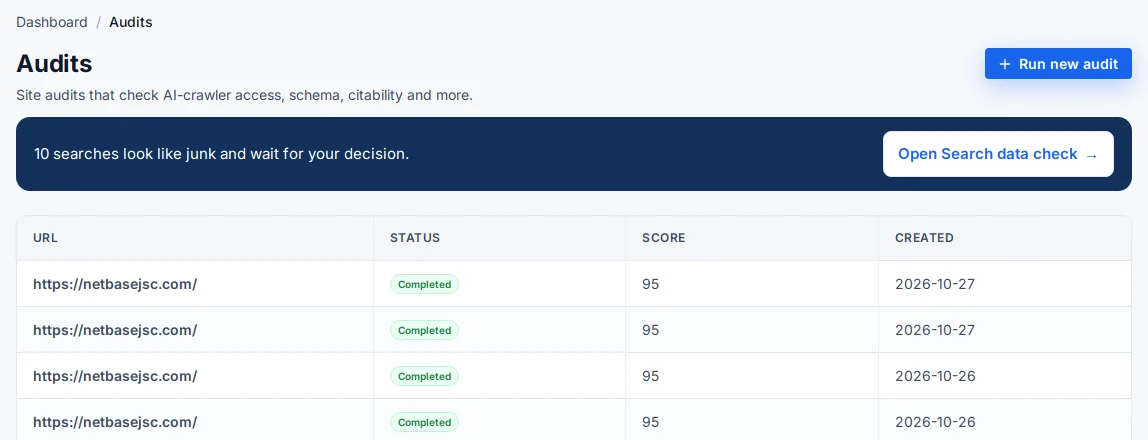
Expected result: a new row appears with the status Running, then Completed.
Step 2: Open the finished audit and read the overall score
Click the row. The first card is the Overall score, weighted across all the checks below it. Next to it, Citability signals scores how easy your text is to quote: clear opening answers, numbers, named sources.
For netbasejsc.com the overall score was 95 and citability 78. A high overall score with a lower citability score is common: the site is technically open to AI, but the text still reads like a brochure rather than an answer.
Expected result: you know your overall score and your weakest card.
Step 3: Read each check card
Each card is one check, scored 0 to 100, with the finding in its title. On the NetbaseJSC audit of 27 Oct 2026:
- Slow server response (TTFB 3,823 ms): 0. The only failing card. Crawlers that wait more than a few seconds read fewer pages.
- llms.txt found (no llms-full.txt): 80. The short file was there; the full version was missing.
- AI crawlers allowed, No AI-blocking meta tags, Rich schema.org markup, Strong entity signals, Good server-side content, Sitemap with recent lastmod: 100 each.
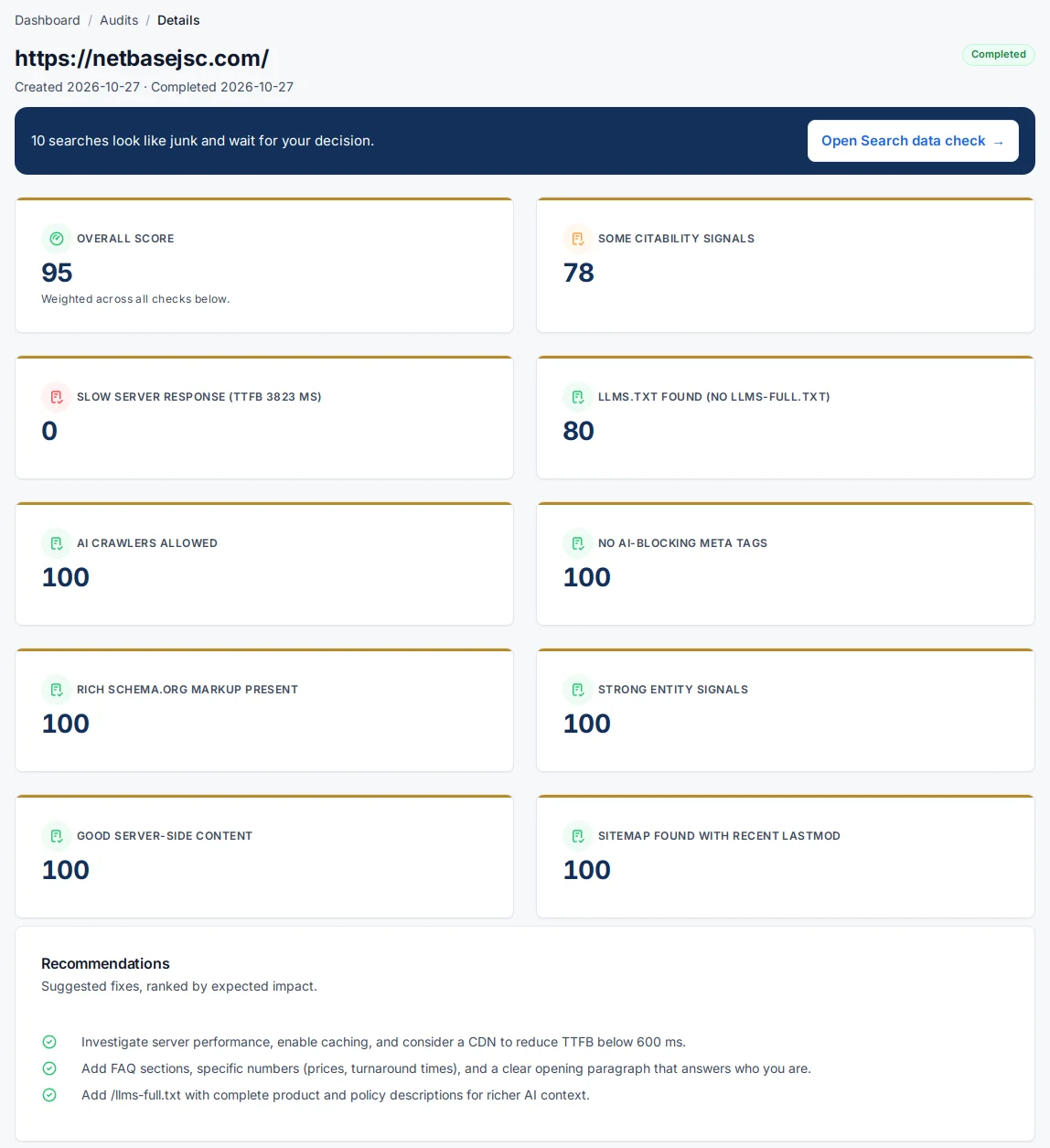
Expected result: a short list of the cards below 100.
Step 4: Turn the recommendations into work
Under the cards, Recommendations ranks the fixes by expected impact. For NetbaseJSC they were: bring TTFB below 600 ms with caching or a CDN; add FAQ sections, specific numbers and a clear opening paragraph; publish /llms-full.txt.
Send the technical items to whoever runs your hosting, and the content items to your writers. Leadee also turns audit findings into fix tickets with a patch for each one; see Work the fix-ticket queue.
Expected result: every recommendation has an owner.
How to check it worked
- Run the audit again after a fix ships. The card you fixed should move up, and the overall score with it.
- Keep each audit: the Audits list is your history, so you can show when a score changed and why.
- For one page at a time from your own AI agent, the
analyze_urltool in the Leadee MCP server returns the same kind of report, plus a prioritised fix list.
Common problems and how to fix them
The speed card fails even though the site feels fast
- Sign:
- "Slow server response" at 0 while the page opens quickly in your browser.
- Cause:
- your browser hits a warm cache; a crawler from another region often does not. On netbasejsc.com the audit measured 3,823 ms on 27 Oct 2026, and a manual check on 24 Nov 2026 measured 1.46 s for the home page.
- Fix:
- cache full HTML at the edge for anonymous visitors and keep the origin warm. Re-run the audit from Leadee, not from your own browser.
- Prevent:
- re-audit after every hosting or theme change.
The score is high but AI still does not name you
- Sign:
- overall score above 90, but the tracker shows AI naming other companies for your buyer questions.
- Cause:
- the audit checks whether AI can read and quote you. Whether AI chooses you depends on the answers on your pages and on what third-party sites say about you.
- Fix:
- read Track AI visibility and Find citation gaps, then work the answer-block fix tickets.
- Prevent:
- audit and track together; one without the other misleads.
The audit fails or stays "Running"
- Sign:
- status Failed, or no result after several minutes.
- Cause:
- the URL redirects to a login, blocks unknown user agents, or takes too long to answer.
- Fix:
- audit the final URL after redirects, allow Leadee's crawler in your firewall, and run again.
- Prevent:
- keep a public, fast home page; it is the page AI reads first.
FAQ
How is the overall score calculated?
It is weighted across the check cards on the page, as the card itself says. Each check shows its own 0–100 score, so you can see which card pulled the total down. On NetbaseJSC one failing card (server speed at 0) still left an overall score of 95, because the other eight checks were strong.
Should I audit every page?
No. Audit the home page and your top service, product and comparison pages first. For the whole site, Leadee's site monitor crawls on a schedule and opens issues by page type, which you read under Site audit › Issues.
What is a good citability score?
There is no fixed pass mark. Treat it as a trend: rewrite the opening paragraphs of key pages so they answer the buyer's question in two or three sentences with a number or a named source, then re-audit and watch the score move.
Does the audit cost credits?
Audits count against your plan's usage. When an action would spend credits, Leadee shows the cost before it runs, and the header shows your credit balance at all times.
Can GEO guarantee results?
No. AI answer engines change their output frequently, and no vendor — including Leadee — can guarantee a ranking or a mention. Leadee publishes confidence intervals on every metric so you can see how much a result can vary run to run.
How does Leadee measure AI visibility?
Leadee runs your prompt set against each AI engine on a weekly to daily schedule, depending on plan, through official vendor APIs (OpenAI, Gemini, Perplexity, Anthropic, DataForSEO) — never by scraping consumer chat interfaces — and reports mention rate, citation rate, average position, share of voice and sentiment with a 95% confidence interval.
Who do I talk to?
Email support@leadee.ai or use Talk to an expert at https://leadee.ai/contact-sales — the Netbase JSC team behind Leadee replies by email or WhatsApp — or WhatsApp the CEO directly at https://wa.me/84937869689.
What to do next
Next guide: Work the fix-ticket queue. Previous: Connect Google Search Console and Bing. Prefer an expert review? Hire a Leadee expert.