
Work the Leadee fix-ticket queue, from finding to re-measured fix
A fix ticket is one problem Leadee found, with the evidence, a priority, a ready-made patch and a date to measure again. Working a ticket takes 5 steps and about 20 minutes: open the queue, read the evidence, take the patch, ship it on your site, and mark it fixed so Leadee re-measures. NetbaseJSC triaged 107 tickets in one session on 9 Nov 2026.
By the Leadee team at Netbase JSC · Updated
Before you start
- You need
- A Leadee project with at least one audit or tracker run; edit access to your website or a person who has it
- Time
- About 20 minutes per content ticket; minutes for an off-site ticket you decide to skip
- Applies to
- Every Leadee plan; any CMS (the patch is plain text and JSON)
- Tested
- 25 Nov 2026 on the NetbaseJSC project
Where fix tickets come from
Leadee writes a ticket when the data shows a gap you can close: an audit card below 100, a buyer question where AI names other companies and not you, or a source AI quotes where you are not listed. Every ticket carries the numbers that created it, so you never act on a hunch.
Step 1: Open the Fixes queue
Open Fixes in the workspace. Each line is one ticket, written as the action to take. For NetbaseJSC most titles read like Answer "best Vietnam software development companies for US startups and mid-size businesses" — competitors are mentioned, NetbaseJSC is not.
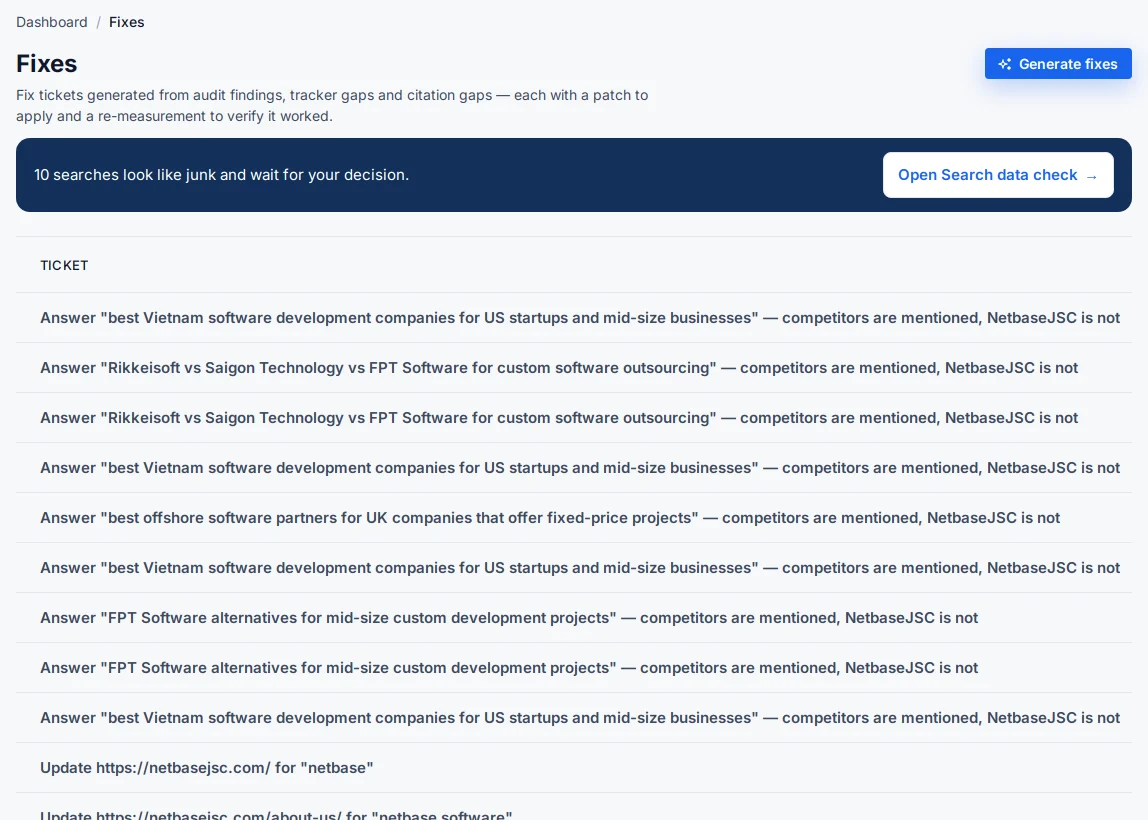
Click Generate fixes after a new audit or tracker run to add new tickets.
Expected result: you see the queue, newest and highest priority first.
Step 2: Read the evidence and the priority
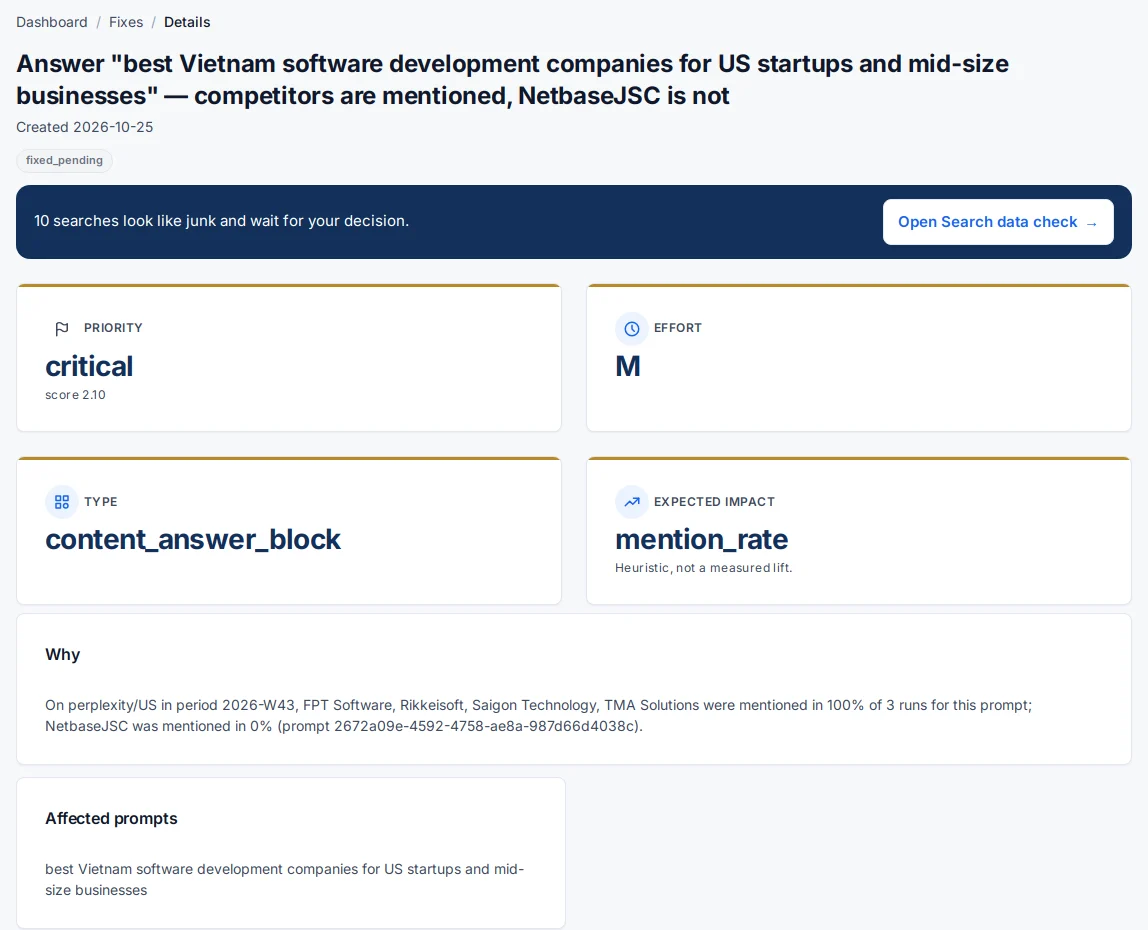
Open a ticket. Four cards sit at the top: Priority (with a score), Effort (S, M, L), Type and Expected impact. Below them, Why gives the measured evidence.
On the ticket shown here the evidence reads: on Perplexity in the US, in week 43 of 2026, FPT Software, Rikkeisoft, Saigon Technology and TMA Solutions were named in 100% of 3 runs for this question, and NetbaseJSC in 0%. Priority: critical, score 2.10. Effort: M.
Expected result: you can say in one sentence why this ticket matters.
Step 3: Take the patch
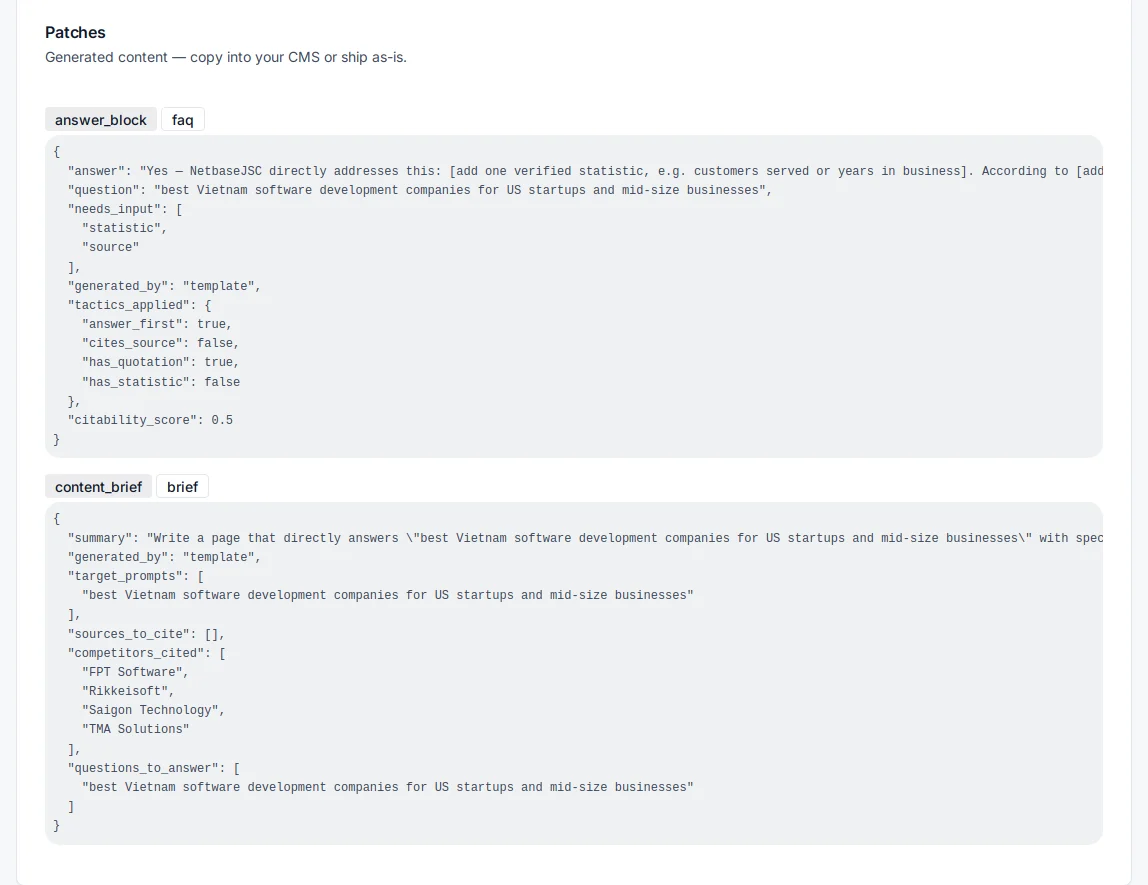
Scroll to Patches. Content tickets come with an answer block (a short, quotable answer for the page) and a content brief (the question to answer, the companies AI named, the sources to cite).
The patch marks what only you can supply. Here needs_input asks for a statistic and a source: Leadee leaves a placeholder rather than invent a number about your company.
Expected result: a draft answer with every placeholder filled by a real, dated fact.
Step 4: Ship the change on your site
Put the answer block near the top of the page that should answer the question, as a short paragraph under a heading that repeats the question. Keep the facts you added in the page text, not only in schema. Publish.
If an off-site ticket asks for a listing you will not pursue now, set it to ignored with a reason. NetbaseJSC ignored 92 off-site tickets on 9 Nov 2026 and kept 4 in its plan, so the queue showed only work the team would really do.
Expected result: the change is live on the URL named in the ticket.
Step 5: Mark the ticket fixed and let Leadee re-measure
Set the ticket to fixed. It moves to fixed_pending with a date to verify. After that date Leadee compares the same question on the same engines with the numbers stored before the fix, and records the after-numbers on the ticket.
Expected result: the ticket shows fixed_pending and a verify date.
How to check it worked
- The ticket's status is fixed_pending, with a before-metric stored.
- After the next tracker run, open AI visibility › What AI says and check the question on the ticket.
- The monthly report's Pages fixed tile counts the pages Leadee records as fixed in the period.
Common problems and how to fix them
The queue is too long to start
- Sign:
- a hundred or more tickets and no clear first step.
- Cause:
- one audit or tracker run can raise many off-site and low-impact tickets at once.
- Fix:
- sort by priority, ship the critical content tickets first, and ignore with a reason the tickets you will not do this quarter. That is how NetbaseJSC went from 110 tickets to 18 active ones.
- Prevent:
- generate fixes after each run, not in large batches.
A patch has placeholders in it
- Sign:
- text such as "[add one verified statistic]" in the answer block.
- Cause:
- Leadee does not invent facts about your business.
- Fix:
- add a real number with its date and source, for example years in business or projects delivered, taken from your own records.
- Prevent:
- keep a short fact sheet of approved, dated numbers for your writers.
Tickets stay "fixed_pending" for weeks
- Sign:
- fixed tickets are not verified. On NetbaseJSC, 11 tickets fixed on 9 Nov 2026 were still pending on 24 Nov 2026.
- Cause:
- verification needs a new tracker run after the verify date; a missed weekly run delays it.
- Fix:
- check that the weekly AI check ran (AI visibility › Overview shows the last run date). Start a run if one was missed.
- Prevent:
- keep the tracker on a weekly schedule.
FAQ
What do the ticket types mean?
Content answer block: add a quotable answer for a buyer question. Update page: improve an existing page for a search it already appears in. On-site technical: a fix in code or hosting, such as speed or llms.txt. Off-site: a listing or review on a third-party site that AI quotes. Each type comes with its own kind of patch.
Is "expected impact" a promise?
No. The ticket says so itself: it is a heuristic, not a measured lift. The measured result comes later, when Leadee compares the same question before and after your fix and stores both numbers on the ticket.
Can my developer or AI agent work tickets without the dashboard?
Yes. The same tickets are available through the Leadee API and MCP server, so an agent can read a ticket, prepare the change and report back. Changes to your site still go through your own approval.
Can Leadee experts do the fixes for us?
Yes. Use Hire a Leadee expert on any screen. You get a quote first and approve it; expert work is paid by invoice and does not use credits.
Can GEO guarantee results?
No. AI answer engines change their output frequently, and no vendor — including Leadee — can guarantee a ranking or a mention. Leadee publishes confidence intervals on every metric so you can see how much a result can vary run to run.
How does Leadee measure AI visibility?
Leadee runs your prompt set against each AI engine on a weekly to daily schedule, depending on plan, through official vendor APIs (OpenAI, Gemini, Perplexity, Anthropic, DataForSEO) — never by scraping consumer chat interfaces — and reports mention rate, citation rate, average position, share of voice and sentiment with a 95% confidence interval.
Who do I talk to?
Email support@leadee.ai or use Talk to an expert at https://leadee.ai/contact-sales — the Netbase JSC team behind Leadee replies by email or WhatsApp — or WhatsApp the CEO directly at https://wa.me/84937869689.
What to do next
Next guide: Track AI visibility. Previous: Run a GEO site audit. Want the queue worked for you? Hire a Leadee expert.